Git Strategy for Agentic Development: The Solo Developer Version
How to structure branches, worktrees, and promotion gates when building with agents as a solo developer or small team. Isolation, gated integration, and selective promotion without enterprise infrastructure.
AI coding tools change quickly; the repo strategy underneath them does not. For a solo developer working with agents, git is no longer just version control. It is the control system for isolation, promotion, and feedback. The question worth asking is not whether a better agent arrives next quarter. It is whether the workflow still makes it hard for unfinished work to leak into production.
The Recommendation in One Diagram
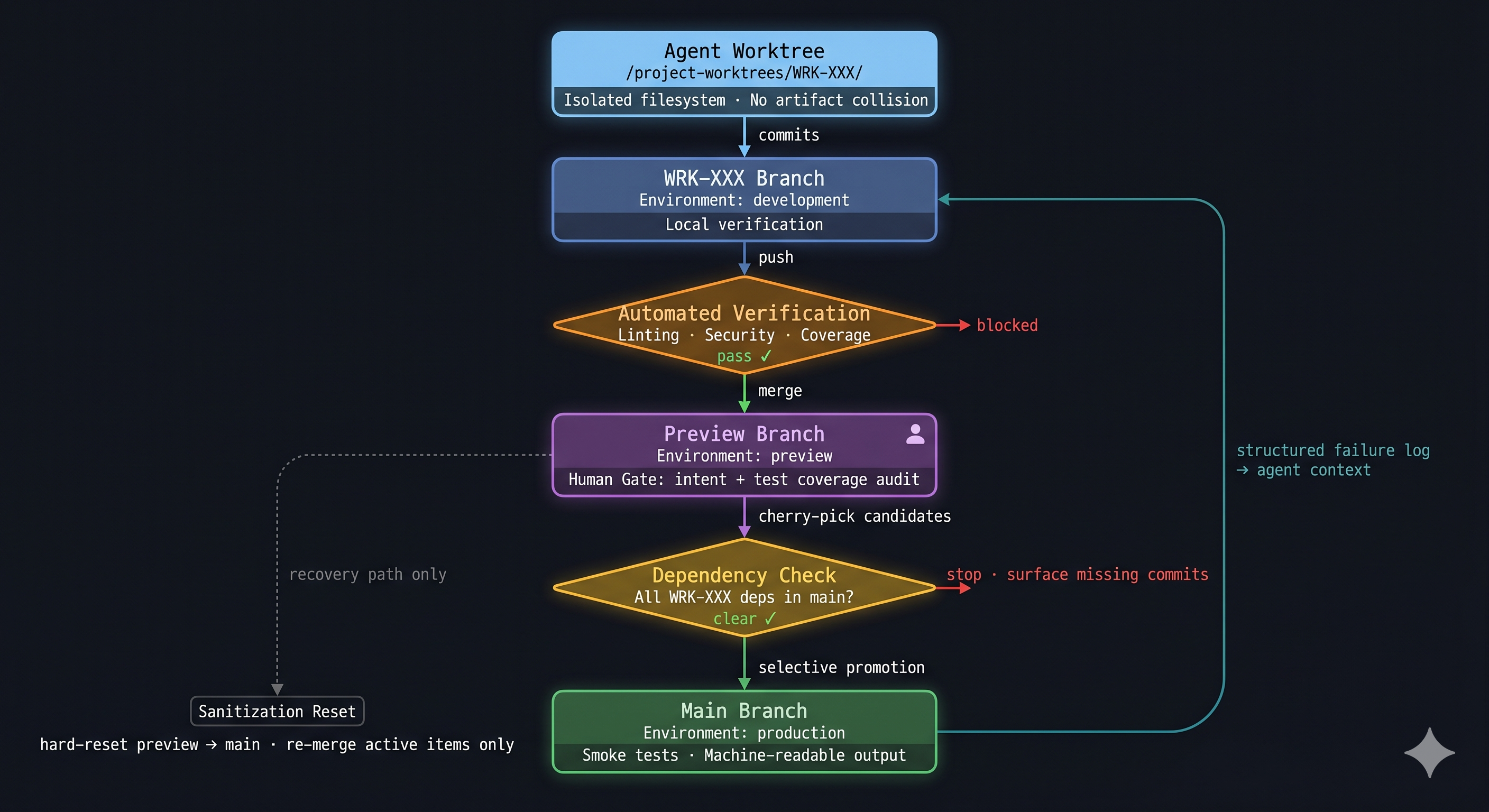
Read it top to bottom. The agent starts in a physically isolated worktree and commits to a work-item branch. Before anything merges to the integration branch, an automated verification gate runs linting, security scanning, and coverage checks. The human gate follows: intent review and test coverage audit, not syntax. A dependency check enforces that no promoted commit silently relies on un-promoted work. Smoke tests in production return structured output the agent can consume directly. The dotted left path is sanitization, a recovery route rather than routine workflow.
Why Agentic Work Needs Different Git Discipline
Agents reset context between sessions. A human developer carries a week of project history in memory. An agent reconstructs that history from the repo. The agent’s working memory stack has three layers: the context window (active session state), work-item documents and ADRs (recorded intent), and commit trailers (structured metadata attached to individual commits). The git commit log is not the memory itself. It is the structural index that lets the agent retrieve the correct context during session reconstruction. A commit like fix bug provides no retrievable key. A commit tied to WRK-236 with a concrete scope gives the next session a path back to the work-item document where the original intent lives.
Two other asymmetries are worth naming. Agents produce commits faster than a pull-request review cycle can absorb, removing the natural pauses where problems surface. And the hardest failures in agentic delivery (environment mismatches, auth edge cases, binding failures) only appear after deployment, which means verification output needs to be structured enough for the agent to act on without a human describing a browser screen.
The Branch Strategy
main is the stable baseline. The Active Integration Zone (preview) is where in-flight work items accumulate and are validated together before any of them reach main. Branching from the integration zone forces early resolution of in-flight collisions. Work items that would conflict in production will conflict in the integration zone first, which is where they should be found.
The core workflow: the agent operates in a dedicated worktree pointing at a WRK-XXX branch created from the Active Integration Zone. Work is committed there, passes automated verification on push, merges into the integration zone for human review, clears a dependency check, then promotes selectively to main. Physical worktree isolation is covered in the Environment section.
One work item per branch. A feature branch should map to one tracked change. In this repo that means WRK-XXX. The reason is not ceremony; it is traceability. When an agent resumes work later, the work item identifier links the branch, the commits, and the work-item document that holds the original intent.
Commit messages carry the work item ID. This matters more in agentic work than in conventional solo development. If every non-merge commit includes WRK-XXX, the next session can reconstruct which commits belong to the item being promoted, then retrieve the corresponding work-item document for intent. The commit log is the index; the document is the content.
Why selective promotion matters
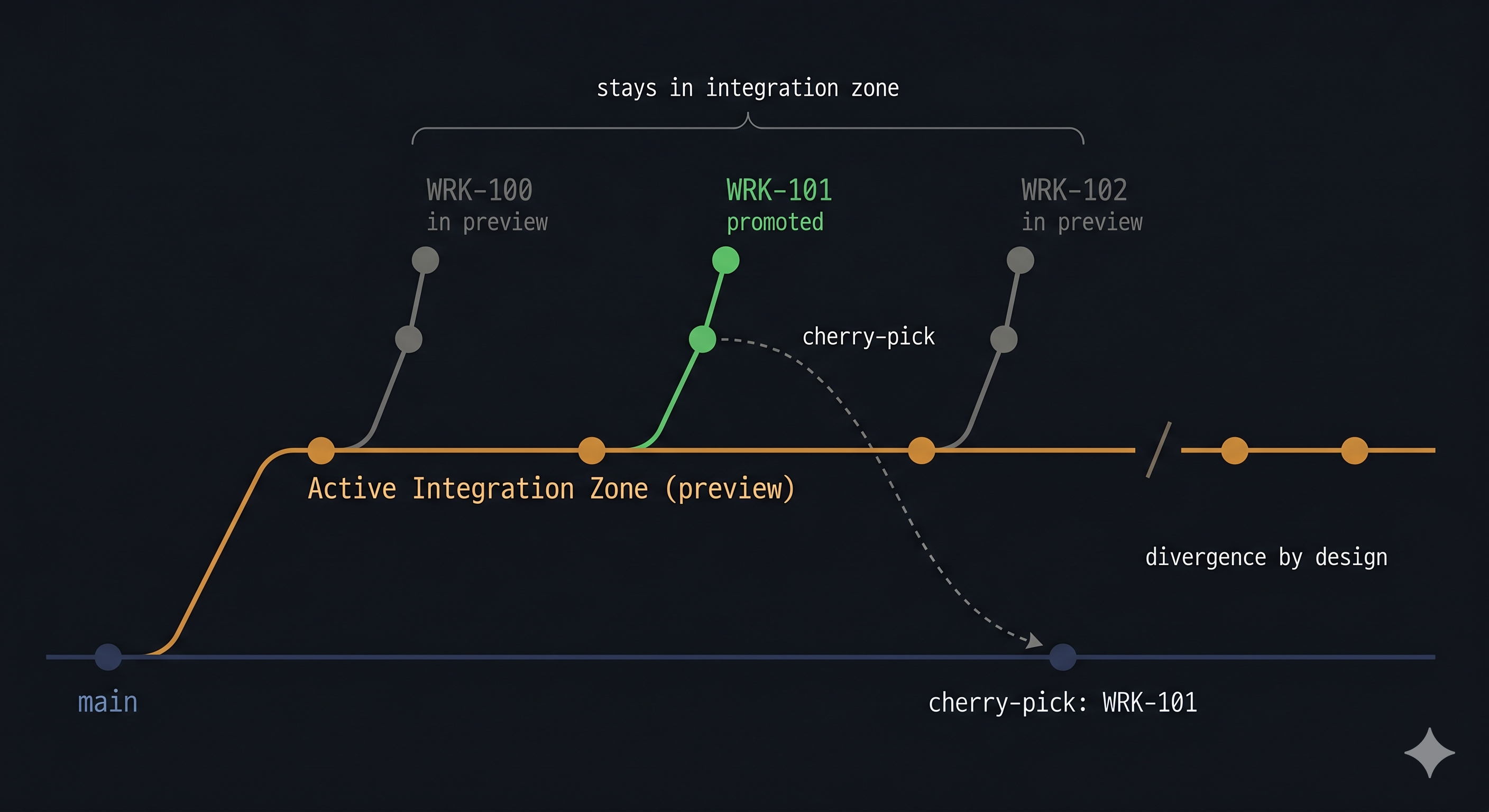
The safer approach is work-item promotion. In this repo, the production promotion step selects the commits tagged to one WRK-XXX item and promotes only that set. The integration zone and main are allowed to diverge between promotions. That divergence is by design, not a problem to clean up.
Cherry-picking individual commits preserves attribution and keeps main’s history directly traceable to work items. Squash-merging looks cleaner but collapses that traceability. In an agentic workflow where the commit log is the session-reconstruction index, the individual commit log is worth keeping.
The diagram below shows three concurrent work items. WRK-101 has cleared verification and is cherry-picked to main. WRK-100 and WRK-102 remain in the integration zone. The slash on the integration zone line marks where main and the integration zone part ways. That gap is the intended state, not something to close on a schedule.
A few rules need to be explicit.
- Branch from the Active Integration Zone, not
main. Conflicts surface during development, not at promotion time. - The integration zone may contain multiple active items at once.
mainshould receive only the commits for the item that has cleared the release gate.mainand the integration zone do not need routine resynchronization after every promotion.- If more work is needed after a production promotion, start a new
WRK-XXXbranch from the current integration zone, not extra commits on the already-promoted item. - The integration zone accumulates abandoned work over time. When its failures can no longer be traced to anything active, sanitize: hard-reset to
main, then re-merge only the active in-flight branches. Deliberate maintenance decision, not a scheduled task.
The dependency trap in selective promotion
If WRK-101 was developed on an integration zone branch that already contained un-promoted WRK-100 code, promoting WRK-101 alone may silently break production. WRK-101 passed in the integration zone because its dependency was quietly present. On main, that dependency does not exist yet.
The check before any promotion: confirm that every dependency introduced on the feature branch is either already in main or included in the same promotion set. This is the most common failure mode of selective cherry-pick promotion, and it is invisible until it lands in production.
The promotion script should enforce this, not rely on recall. Before cherry-picking, verify that every commit reachable from the feature branch but not from main is either tagged to the current promotion item or explicitly declared as a co-promoted dependency. If the validation fails, the script stops and surfaces the unresolved commits by name.
Hotfixes
Hotfixes branch from main, not the integration zone. Before merging, verify that the hotfix introduces no dependency on un-promoted integration zone work (Check A). After landing in main, merge it back to the integration zone and verify that no active in-flight branch has a conflict with the hotfix (Check B).
Incident response
When something fails in production, revert the commits in main that belong to the failing work item. Do not reset the integration zone; other in-flight work continues.
Keep a short record of excluded work items so the same item cannot be quietly re-promoted the next time it passes verification. At solo scale, a text file, a pinned issue, or an issue tracker label is enough. The mechanism matters less than the habit: a reverted work item should not re-enter main without explicitly addressing the failure reason.
The Environment Strategy
Development is for fast local validation against a running local server: obvious rendering problems, route issues, and broken assumptions. Speed is the point.
Preview (Active Integration Zone) is for real cloud-shaped validation. Close enough to production that routing, auth, bindings, and deployment behavior are visible before release. Not polish. Confidence.
Production is for work that has already been explicitly promoted. It should never be the first place a work item gets basic validation.
Physical isolation: worktrees
The isolation problem in agentic sessions is filesystem state: working directory, build artifacts, node_modules state between runs. Worktrees solve this at near-zero setup cost. A worktree is a second checked-out copy of the repo in a separate directory with its own branch and index. Creating one takes a single git command. Tearing it down is equally simple. The agent operates in /project-worktrees/WRK-XXX/; the primary directory stays on the integration zone, clean and inspectable.
Containers are the right answer when the binding constraint is runtime reproducibility: consistent Node.js version, OS-level dependencies, hermetic build environment. When session-state collision is the actual constraint and the runtime is already consistent (same machine, same toolchain), containers add image build, mount configuration, and network setup without addressing the underlying problem. A container with a bind-mounted repo shares the same git object store as a worktree; the git storage argument does not favor either approach. The real distinction is setup cost versus isolation scope. Match the tool to the actual constraint.
Worked Example: Astro, React Islands, and Cloudflare Pages Functions
The public site is built with Astro. Interactive pieces run as React islands. Backend endpoints live as Cloudflare Pages Functions. Data and service integrations sit behind environment-specific bindings and external APIs. Common enough shape that the workflow generalizes.
A work item starts with the agent operating in a dedicated worktree at /project-worktrees/WRK-XXX/, pointing at a WRK-XXX branch created from the Active Integration Zone. Local work happens there. A local dev server check catches obvious rendering problems, route issues, and broken assumptions before anything is integrated. The primary repo directory stays on the integration zone, untouched.
Once the branch is in good shape, automated verification runs on push: linting, type checks, security scan, coverage validation. Only after that gate clears does the branch merge into the integration zone, triggering a preview deployment. This is the first place to ask the cloud-shaped questions local dev cannot answer reliably.
- Does the route behave the same way behind the real deployment surface?
- Does auth work with the deployed environment?
- Do environment-specific bindings resolve correctly?
- Does the function return the expected response codes outside local tooling?
Only after that preview pass does the work item become eligible for production promotion.
The production step promotes the selected WRK-XXX item from the integration zone to main, deploys, and runs smoke checks against the live system. The smoke checks are what make production failures visible in a form an agent can act on: endpoint response, status code, failing subsystem, specific check name. A structured log of the failing subsystem (service name, error type, relevant trace) eliminates the disambiguation round that otherwise opens every recovery session.
Without that, the workflow falls back to human relay. With it, a failed deploy becomes a bounded debugging problem.
The Orchestrator’s Mandate: Detecting Hallucinated Correctness
Automated verification catches a specific class of problems: type errors, failing assertions, security scan findings, coverage gaps. It does not catch an agent that implements the wrong thing correctly.
Consider this scenario. A work item specifies a rate limiter that resets the per-user counter at the start of each billing cycle. The agent misreads the specification and implements a counter that resets every 24 hours. It then writes tests that assert the 24-hour reset behavior. Every test passes. The coverage threshold is met. Automated verification clears the branch. Nothing in the automated pipeline catches the failure, because nothing in the pipeline knows what the work item actually specified.
Only intent review catches it.
This is the failure mode that automated tooling cannot address: the agent validates its own output against its own understanding of the requirement, which may have drifted from the actual requirement at read time. A passing test suite is evidence that the implementation is internally consistent. It is not evidence that the implementation matches the intent.
The human gate at the integration zone is not a pass/fail check on automated results. It is a review of intent versus implementation. The question is whether the code does what the work item specified, not whether the tests pass. Spot-checking the tests themselves is part of this: does a given test verify the intent of the work item, or does it verify what the agent decided to implement?
In agentic workflows, where the agent both writes the implementation and writes the tests for it, this is the primary purpose of the human gate. Not overhead. Not optional.
Rules That Keep It Honest
A git strategy becomes real when the shortcuts are removed.
- No direct commits to the Active Integration Zone or
main. Implementation work happens on the work-item branch. - No direct deploy commands as a normal release path. If the release bypasses git promotion, the audit trail and the gates disappear.
- Automated verification runs before the human gate, not after. Linting, type checking, security scanning, and test coverage validation are machine jobs. A verification sub-agent should run these checks on every branch push and block promotion eligibility until they pass. The human is the orchestrator, reviewing intent, integration, and correctness. Not the first line of defense against a missing type annotation or a shadow dependency.
- Production verification must be machine-readable. Smoke tests should return concrete results an agent can interpret without manual translation.
- Keep a record of excluded work items and check it before every promotion. At solo scale, any persistent record is sufficient.
The pattern is structural enforcement over discipline. If a rule matters, the tool should refuse to proceed when it is violated.
The Principle Underneath the Workflow
The real design problem in agentic development is not how to get more code written. Agents handle that. Keeping fast code generation from outrunning isolation, release control, and feedback is harder. Git is still the best practical substrate for that job because every part of the delivery system already understands branches, commits, diffs, promotions, and deploy triggers.
Not because git is perfect, and not because a purpose-built agent workflow system will never appear. A durable branch model and environment strategy just do more for correctness than another round of tool switching. The agent can change. The workflow that isolates work, gates production, and returns readable feedback should not.
This is the workflow for a solo developer working with agents. The structural pattern (isolation, gated integration, selective promotion) holds at any scale. What changes once you cross a team boundary or work on platforms where a deployment has global visibility is the enforcement model: formal ledgers, CI service accounts, and branch protection rules that make the policy mechanical rather than conventional.
Subscribe
Get new posts by email
Enterprise architecture, AI systems, and platform strategy.